Về trang cửa hàng

Advanced Custom Fields for WooCommerce Giá gốc là: 100.000₫.80.000₫Giá hiện tại là: 80.000₫.
Scripts Dequeuer Backend
150.000₫
Mô tả
Description
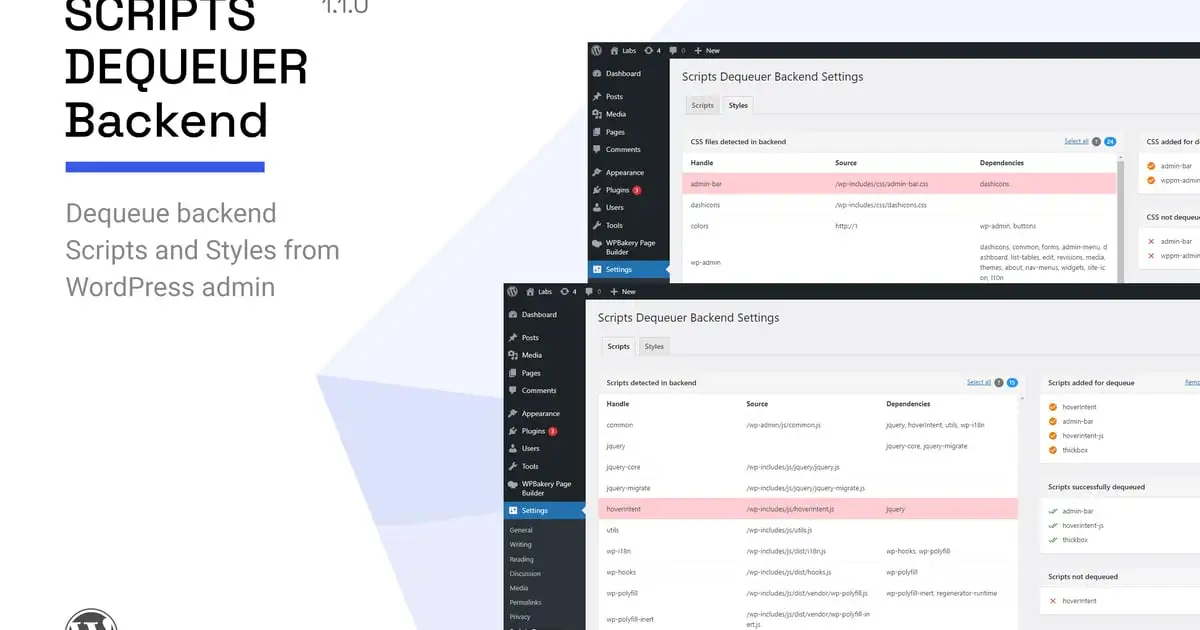
“Scripts Dequeuer Backend” helps you dequeue WordPress backend scripts and styles from administration area. Backend scripts and styles can be easily dequeued (in controlled environment) without touching any code.
Usage scenario
If you are running a website using WordPress, it is quite obvious that you might be using several plugins for site features and functionality. Many plugins use similar (or same) resources and it is possible that these resources are loaded multiple times in your WordPress admin. This may happen if the resource (JS/CSS) handle names are different.
For example, consider a scenario in which two or more plugins load same CSS file individually. (Say, fontawesome stylesheet). Or a case in which two or more plugins use same jQuery plugin with different handle names. Such files are loaded multiple times, causing extra load in admin area. Each time you access any admin page; these files slow down overall page load time.
Admin page load time can be improved by removing such redundant files. Removing such files not only improves page load time, but will also help in preventing issues caused by conflict of redundant files.
The “Scripts Dequeuer Backend” plugin helps you dequeue such files easily with it’s simple and reliable interface. The plugin also takes care of not dequeuing system core files which are required for proper working of admin interface. With such controlled environment, one can safely dequeue CSS and JavaScript files added by third party plugins.
### How it works
If backend scripts and styles are enqueued using native WordPress hooks (admin_enqueue_scripts, wp_print_scripts, wp_print_styles, etc.), Scripts Dequeuer Backend can detect all such scripts/stylesheets and list them inside WordPress admin area.
From detected scripts/stylesheets, you can select items and add them for dequeue. Upon saving changes, selected scripts and stylesheets will be dequeued and listed separately.
If a user selects system core files for dequeue, they are not allowed and listed as “not dequeued” files. However, the plugin has a filter hook for modifying list of files which can be allowed or disallowed for dequeue.
The plugin takes care of not dequeuing scripts which are required by other scripts. For example, if you select jQuery for dequeue, it won’t be dequeued if any other file still requires it. This is to prevent other scripts from malfunctioning.
Why use this plugin?
This plugin is intended for users who need a user friendly and reliable solution for dequeuing backend scripts without touching any code.
The plugin not only helps you dequeue backend files, it gives you a clear picture about files used in backend, their sources and dependencies. If you are keen about admin area performance and optimization, you can definitely have this useful plugin in your collection. You will not regret it. Please also check plugin screen shots to get an idea about backend settings and features.
### Key features
- Compatible with WordPress 6.2.x
- Unbranded settings panel with JavaScript tab navigation
- Shows complete list of scripts and styles detected in backend
- Detects scripts and stylesheets which are enqueued using WordPress native hook
- Dequeues scripts and stylesheets in controlled environment
- System core files are prevented from dequeue
- Ability to dequeue all scripts and stylesheets at once, or as per selection
- Shows separate portlets for “Dequeue list”, “Successfully dequeued list”, and “not dequeued list”
- Each portlet shows file count for better idea about number of files
- Clean and optimized code as per WordPress coding standards
- 100% Translation ready with sample .pot file included
- Documentation help manual with usage instructions
- Works with most themes and plugins (free + premium)
- Compatible on all major browsers with IE 9+
- Professional support in reasonable time
Credits
Font icons from icomoon app
[http://icomoon.io/app/](http://icomoon.io/app/)
Changelog
= Apr 03, 2023 – v1.1.0 =
- Ensured compatibility with WordPress 6.2 and php 8.0.0
- Fixed: Removed deprecated jQuery ready event
- Fixed: Scripts table row were not selectable
- Fixed: Removed deprecated screen_icon WordPress function
= 1.0.0 =
- Initial release
Có thể bạn quan tâm


Thông tin thanh toán


Đăng ký theo dõi
Đăng nhập
Cũ hơn