Description
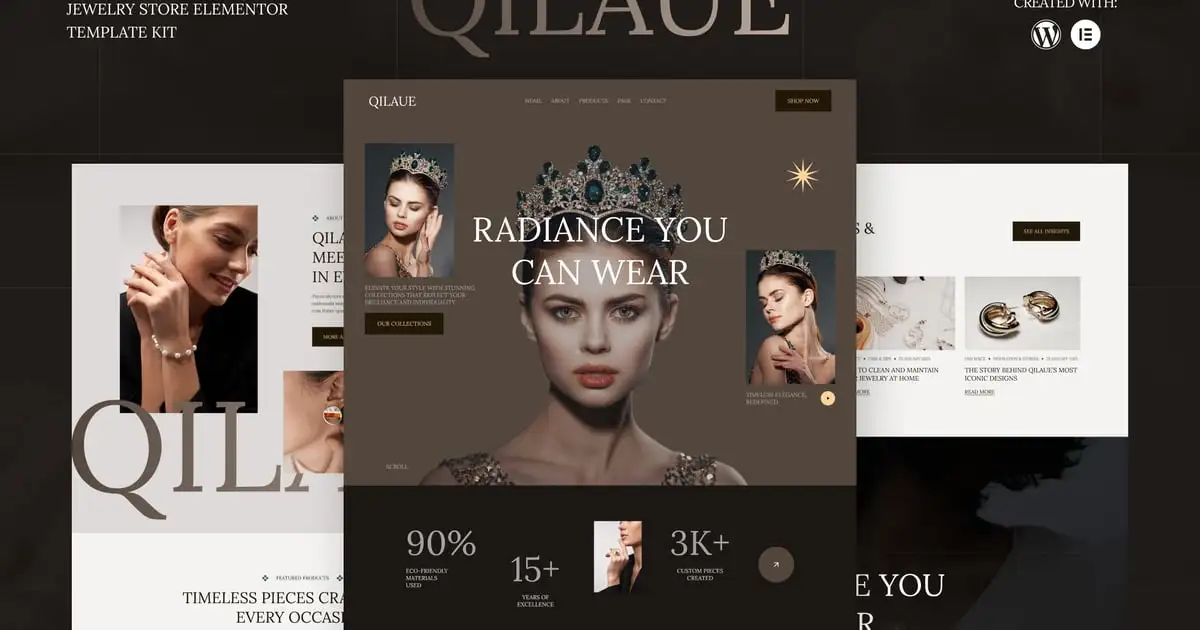
Qilaue – Jewelry Store Elementor Template kit is a sophisticated and stylish Elementor Template Kit tailored for jewelry stores, luxury brands, and high-end fashion boutiques. With its elegant design and refined layout, Qilaue ensures a premium online presence that highlights your exquisite collections, from engagement rings to designer watches.
Built with Elementor, this template kit provides full customization without any coding skills required. It is fully responsive, SEO-optimized, and designed for high performance, making it the perfect choice for businesses looking to enhance their digital presence and drive more sales.
Features
- Fully Responsive & Mobile-Friendly
- Clean, Minimal & Luxurious Design
- 100% Customizable with Elementor
- SEO-Optimized for Better Search Ranking
- Integrated MetForm for Easy Customer Inquiries
- Stylish Product & Service Pages
- Global Theme Styles for Design Consistency
Templates Include
- Global Theme Style
- Home
- About Us
- Products
- Product Details
- Services
- Service Details
- Team
- Pricing
- Faq
- Contact Us
- Blog
- Single Post
- Error 404
- Header
- Footer
- MetForm Contact
Required Plugin:
- Elementor
- Jeg Elementor Kit
- MetForm
How to Use Template Kits:
THIS IS NOT a WordPress Theme. Template kits contain the design data for Elementor only and are installed using the Envato Elements plugin for WordPress or directly through Elementor.
Detailed Guide:
https://help.market.envato.com/hc/en-us/articles/36033428836889-How-to-Upload-Install-Elementor-Template-Kits-from-Themeforest-to-WordPress
For further support, go to Elementor > Get Help in WordPress menu.
How to Import Metforms
If you have Elementor Pro, skip install of Metform and form blocks.
- Import the metform block templates
- Import the page template where the form appears and right-click to enable the Navigator
- Locate and select the Metform widget and click Edit Form. Choose New, then Edit Form. The builder will appear
- Click ‘Add Template’ grey folder icon.
- Click ‘My Templates’ tab.
- Choose your imported metform template, then click ‘Insert’ (click No for page settings).
- Once the template is loaded, make any desired customizations and click ‘Update & Close’ The form will appear in the template
- Click Update
How to setup header in Jeg Elementor Kit plugin
If you have Elementor Pro, headers and footers may be customized under Theme Builder.
- Go to Jeg Elementor Kit menu item > Header Template
- Click Add New Header
- Add condition > All Site and click Create
- Click gray folder icon to access My Templates tab
- Insert the header template.
- Customize and Save.
Large Text
Large background text is the logo of your store, Replace “Qilaue” image with your desired wordtype or logo to 1600px wide for similar effect.
Image License:
This Template Kit uses demo images from Envato Elements. You will need to license these images from Envato Elements to use them on your website, or you can substitute them with your own.
- https://elements.envato.com/collections/9MQXG2VPNF