Về trang cửa hàng
Advanced Custom Fields for WooCommerce Giá gốc là: 100.000₫.80.000₫Giá hiện tại là: 80.000₫.
Mô tả
Description
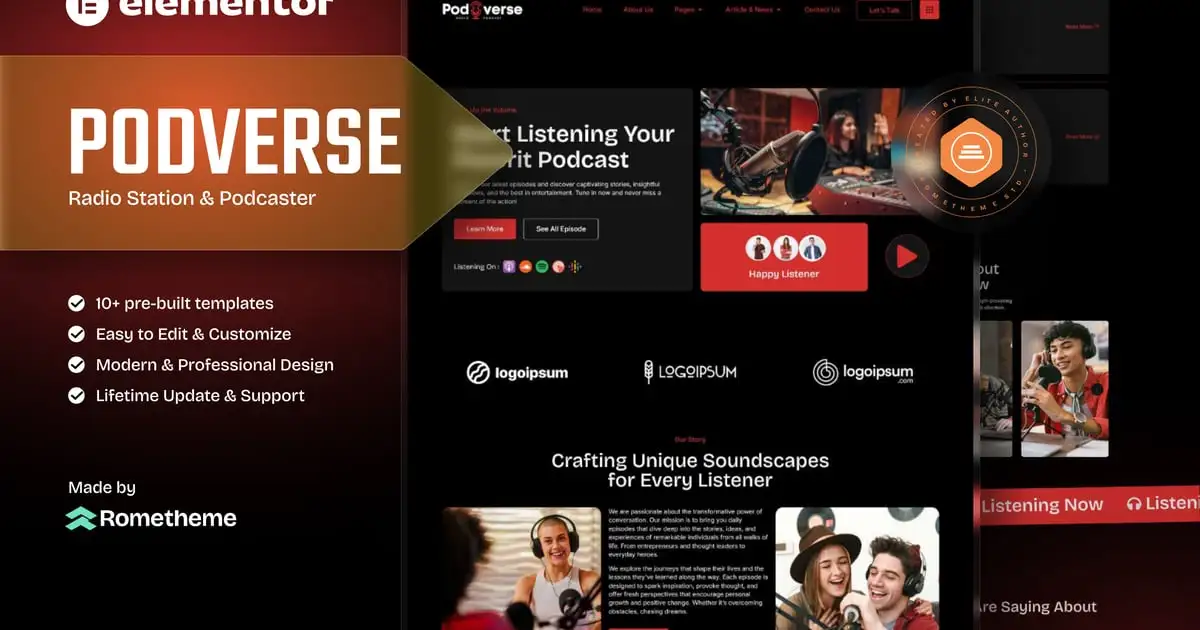
Podverse – Radio Station & Podcaster Elementor Template Kit is a comprehensive solution for creating modern and professional websites tailored for Radio Station & Podcaster. Build your website effortlessly with responsive designs and no coding required.
Key Features:
This template kit is built using Elementor, the leading WordPress website builder, offering unparalleled ease of use and functionality.
Key benefits include:
- Responsive Design: Optimized for desktops, tablets, and mobile devices.
- Elementor Compatibility: Drag-and-drop interface; no technical expertise required.
- SEO-Friendly: Crafted to enhance your website’s visibility in search engines.
- Easy Customization: Fully adjustable to align with your branding.
- Comprehensive Documentation: Detailed setup guide for quick and easy installation.
Who Is It For?:
This template is perfect for businesses looking to establish a professional online presence, such as:
- Radio Station & Podcaster
- Broadcast & Streaming
- Personal or Small businesses
Premium Features:
Stand out with premium features designed to meet modern web design standards:
- RomethemeKit Plugin Integration: This powerful add-on provides everything you need to create stunning and fully customizable websites effortlessly. With advanced features such as custom blocks, theme builder capabilities, icons, forms, and seamless Elementor compatibility, RomethemeKit ensures a streamlined website-building experience.
- Smooth Animations: Enhance user experience with polished visual effects.
- Optimized Performance: Lightweight design for fast loading times.
- 18+ Pre-Designed Templates: Covering all essential business pages.
- Global Kit Style: Manage fonts and colors from one centralized location.
Templates Included:
This kit provides everything you need:
Pages:
- Homepage
- About Us
- Our Team
- Program
- Program Detail
- Podcast
- Testimonials
- Gallery
- FAQs
- 404 Page
- Our Blog
- Single Blog
- Contact Us
Headers and Footers included: Powered by RomethemeKit Plugin.
- Header
- Footer
- Header Off-canvas
Bonus Blocks:
- Block – Contact Form
- Block – Subscribe Form
Plugins installed with kit:
- RomethemeKit for Elementor Plugin (Pro features required for select pages)
- RomethemeForm Plugin
How to Use Template Kits:
This is not a WordPress Theme. Template kits contain the design data for Elementor only and are installed using the envato Elements plugin for WordPress or directly through Elementor.
Elementor Template Kits use the Envato Elements plugin to install.
Detailed Guide:
https://help.elements.envato.com/hc/en-us/articles/36032349441945-How-to-Install-Elementor-Template-Kits-With-the-Envato-Elements-Plugin-in-WordPress-for-Envato-Elements-Subscribers
https://help.market.envato.com/hc/en-us/articles/36033428836889-How-to-Upload-Install-Elementor-Template-Kits-from-Themeforest-to-WordPress
For further support, go to Elementor > Get Help in WordPress menu.
Setup Global Header and Footer in RomethemeKit
If you have Elementor Pro, headers and footers may be customized under Theme Builder.
- Go to Romethemekit > Theme builder > Header and click Add New
- Give it a title and select Header, click Condition tab and add Entire Site and click Save
- Click Edit with Elementor
- Click the gray folder icon to access My Templates tab and select the header template to import and Update.
- Repeat for Footer
How to Setup Forms
If you have Elementor Pro, skip install of form plugin and form blocks.
- Import the form blocks.
- Click on RomethemeForm > Forms in the admin menu
- Click Add New
- Enter a Form Name and click Save and Edit (ignore other options)
- Click the gray folder icon in the builder area and click the My Templates tab
- Click Insert on the form block
- Click Publish/Update
- When customizing pages with forms, click the Rometheme Form Element and select the form from the drop-down
Images:
This Template Kit uses demo images from Envato Elements. You will need to license these images from Envato Elements to use them on your website, or you can substitute them with your own. Blog Content is not included – you will need to add a few posts to WordPress before post content will appear in templates.
- https://elements.envato.com/collections/YUN7F45JCA
Có thể bạn quan tâm


Thông tin thanh toán


Đăng ký theo dõi
Đăng nhập
Cũ hơn