Về trang cửa hàng

Advanced Custom Fields for WooCommerce Giá gốc là: 100.000₫.80.000₫Giá hiện tại là: 80.000₫.
Mô tả
Description
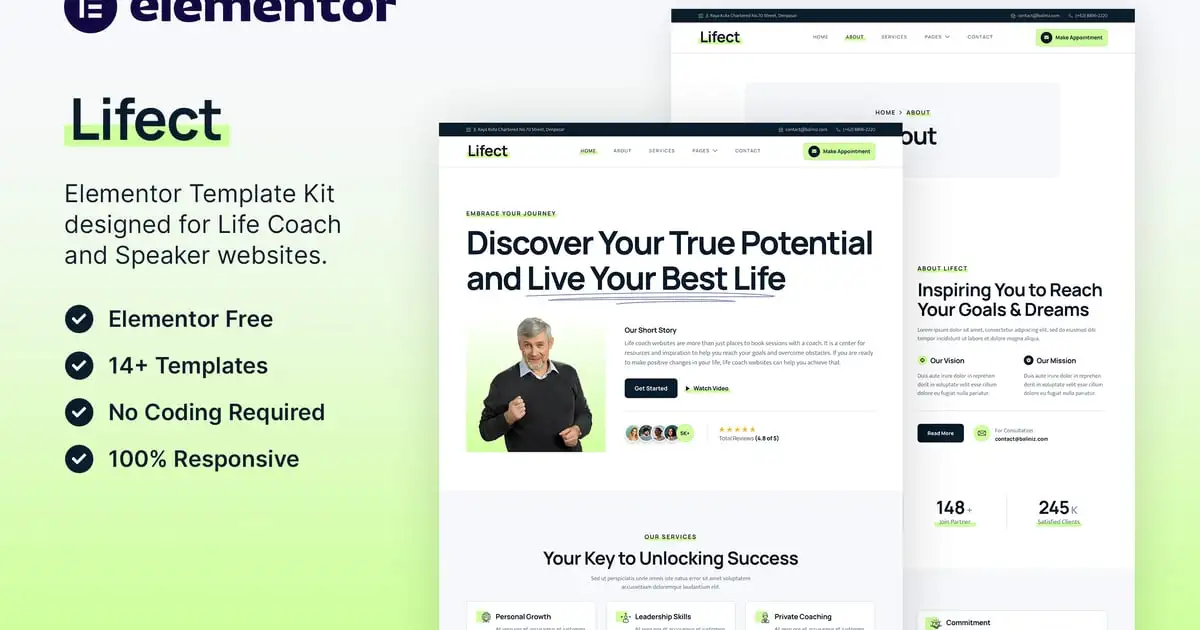
Lifect is a modern and functional Elementor Template Kit designed for
professionals in the life coaching and speaking industry. It is perfect for
life coaches, business coaches, career consultants, personal coaches, and
mentoring services.
With 14+ carefully crafted templates, Lifect makes it easy to build a
professional-looking website that reflects your brand and services. Whether
you’re a seasoned pro or just starting out, Lifect’s easy customization
options and user-friendly interface make it the ultimate tool for showcasing
your expertise and attracting new clients. Get started today and take your
coaching business to the next level!
Features:
- Using Free Plugins (Elementor Pro is not required)
- Modern & Clean Design
- 14+ Ready to use templates
- Fully Responsive Layout
- Retina Ready
- Fully Customizable
- Cross Browser Compatibility: Chrome, Firefox, Safari, Opera
Templates Include:
- Home
- About
- Services
- Seminars
- Pricing
- Blog
- Single Post
- 404 Page
- Contact
- Header
- Footer
- Tab Event
- Metform Contact
- Global Theme Style
Required Plugin:
- Elementor
- Jeg Elementor Kit
- MetForm
How to Use Template Kits:
- Install and Activate the “Envato Elements” plugin from Plugins > Add New in WordPress
- Download your kit file and Do not unzip
- Go to Elements > Installed Kits and click the Upload Template Kit button. You may also import automatically by clicking Connect Account to link your Elements subscription, then import under Elements > Template Kits.
- Check for the orange banner at the top and click Install Requirements to load any plugins the kit uses
- Click import on the Global Kit Styles first
- Click Import on one template at a time. These are stored in Elementor under Templates > Saved Templates.
- Go to Pages and create a new page and click Edit with Elementor
- Click the gear icon at lower-left of the builder to view page settings and choose Elementor Full Width and hide page title
- Click the gray folder icon to access My Templates tab and then Import the page you’d like to customize.
If you have Elementor Pro, headers and footers may be customized under Theme Builder.
Detailed Guide: https://help.market.envato.com/hc/en-us/articles/900000842846-How-to-use-the-Envato-Elements-WordPress-Plugin-v2-0
For further support, go to Elementor > Get Help in WordPress menu.
How to Import Metforms
- Import the metform block templates
- Import the page template where the form appears and right-click to enable the Navigator
- Locate and select the Metform widget and click Edit Form. Choose New, then Edit Form. The builder will appear
- Click ‘Add Template’ grey folder icon.
- Click ‘My Templates’ tab.
- Choose your imported metform template, then click ‘Insert’ (click No for page settings).
- Once the template is loaded, make any desired customizations and click ‘Update & Close’ The form will appear in the template
- Click Update
How to setup header in Jeg Elementor Kit plugin
- Go to Jeg Elementor Kit menu item > Header Template
- Click Add New Header
- Add condition > All Site and click Create
- Click gray folder icon to access My Templates tab
- Insert the header template.
- Customize and Save.
Notes:
This Template Kit uses demo images from Envato Elements. You will need to license these images from Envato Elements to use them on your website, or you can substitute them with your own.
https://elements.envato.com/collections/GXSVNUAEK5
Có thể bạn quan tâm


Thông tin thanh toán


Đăng ký theo dõi
Đăng nhập
Cũ hơn