Theme WordPress dịch vụ vay tiền 02 Giá gốc là: 850.000₫.650.000₫Giá hiện tại là: 650.000₫.

Advanced Custom Fields for WooCommerce Giá gốc là: 100.000₫.80.000₫Giá hiện tại là: 80.000₫.
Mô tả
Description
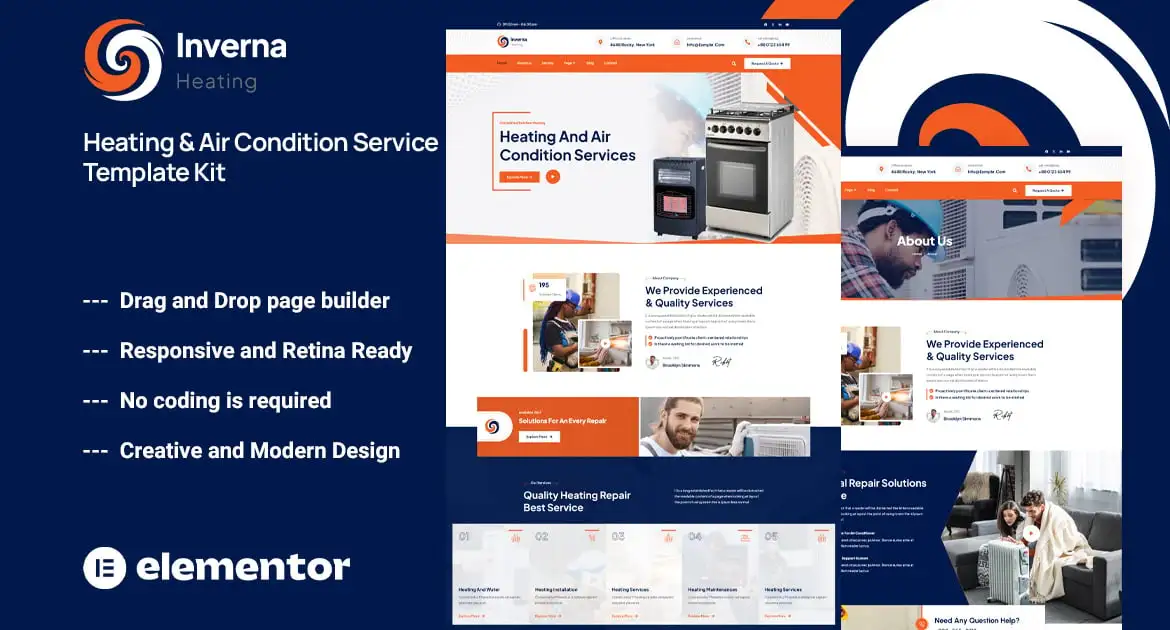
Inverna – Heating & Air Condition Service Template Kit is a professionally designed Elementor Template Kit tailored specifically for HVAC companies, air conditioning services, heating repair, ventilation systems, and related maintenance businesses. With a clean, modern layout and user-friendly structure, Inverna helps you create a strong online presence effortlessly. This kit includes fully responsive pages, service showcases, contact forms, and booking sections — all optimized for performance and mobile devices. Whether you’re launching a new HVAC website or upgrading an existing one, Inverna offers a reliable, stylish solution ready to publish without coding
### Kit Key Features:
- Heating & Air Condition Service
- No Coding Knowledge
- Fully with Elementor free version ( Elementor Pro is not required )
- Header & Footer Builder Included
- Unique and Modern Style.
- Super Clear and Clean Layout
- Lifetime Free Updates
- Cross browser compatible
- Post Widget
- Carousel Slide Box ( Create sliders with anything )
- Ultra Responsive and Retina Ready
- Compatible with any WordPress theme
- Optimized for search engines
### Required Plugins :
- Elementor (
- Themesflat Addons For Elementor
- The Plus Addons
### How to Use Template Kits:
This is not a WordPress Theme. Template kits contain the design data for Elementor only and are installed using the envato Elements plugin for WordPress or directly through Elementor.
Elementor Template Kits use the Envato Elements plugin to install.
Detailed Guide:
https://help.market.envato.com/hc/en-us/articles/36033428836889-How-to-Upload-Install-Elementor-Template-Kits-from-Themeforest-to-WordPress
For further support, go to Elementor > Get Help in WordPress menu.
Setup Global Header and Footer in TF Header Footer
If you have Elementor Pro, setup headers and footers in Theme Builder. Pages you create with Elementor must have the Page Layout set to Elementor Full width for the global header and footer to appear.
- Go to TF > Header Footer and click Add New button
- Give it a title and select Header, Display on Entire Website and click Publish
- Click Edit with Elementor
- Click the gray folder icon to access My Templates tab and select the header template to import and Update.
5 Repeat for Footer
Images
This Template Kit uses demo images from Envato Elements. You will need to license these images from Envato Elements to use them on your website, or you can substitute them with your own.
- https://elements.envato.com/collections/YDJAKWH6EG
Có thể bạn quan tâm
Thông tin thanh toán


Đăng ký theo dõi
Đăng nhập
Cũ hơn