Description
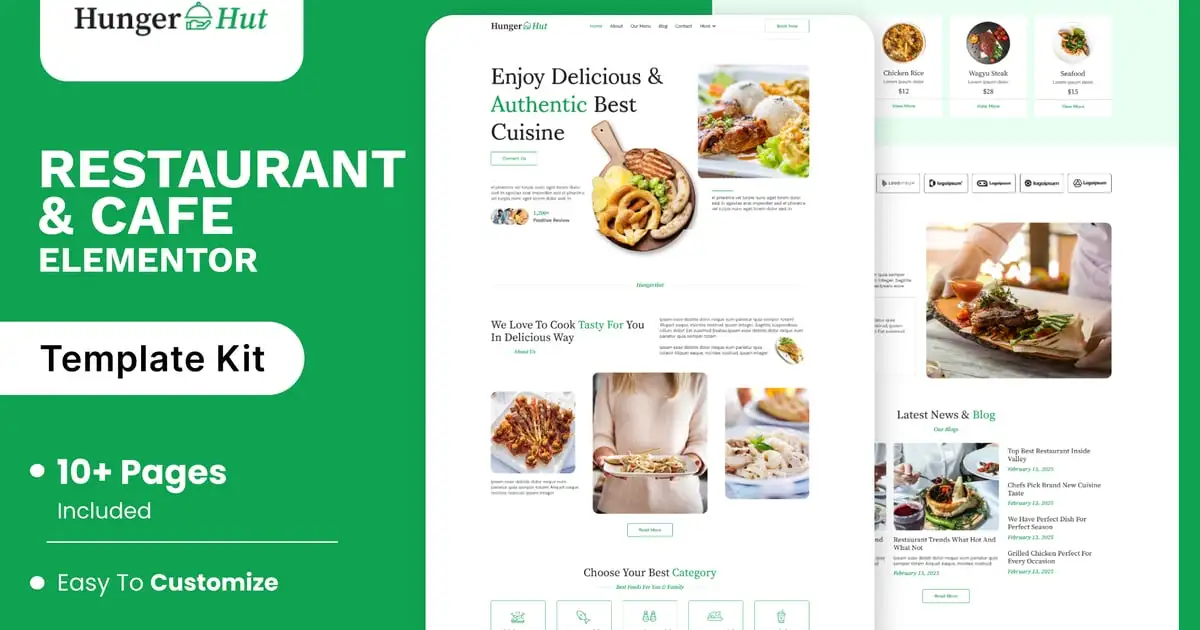
HungerHut is a stylish and appetizing Elementor template kit crafted for restaurants, cafes, bistros, and food delivery services. With its warm design, mouth-watering visuals, and easy navigation, HungerHut is perfect for showcasing your menu, chef specials, customer reviews, and online reservations. Whether you run a cozy coffee shop, a fine-dining restaurant, or a fast-food joint, this kit provides all the essential pages to present your culinary brand with flavor and flair. Fully responsive and effortlessly customizable, HungerHut serves up a seamless experience for food lovers and business owners alike — helping you turn visitors into loyal diners.
Feature
Individual elements can be fine-tuned or fonts and colors can be changed all in one spot.
Drag-and-drop visual builder for true no-code customization.
Design that is both contemporary and professional.
Fast-loading.
Most Elementor themes are compatible with this templatekit.
Templates Include:
Home
About
Our Menu
Blog
Blog Details
Contact
Gallery
Reservation
Team
Testimonials
Coming Soon
404
Sections and Blocks:
Header
Footer
Contact Form
Newsletter Form
Reservation Form
Required Plugins Pre-Installed With the Kit
Elementor
Jeg Elementor Kit
Happy Elementor Addons
MetForm
Template Kits: How to Use Theme
Install and activate the “Envato Elements” plugin in WordPress by going to Plugins > Add New.
Don’t unzip your kit file after downloading it.
Click the Upload Template Kit button in Elements > Installed Kits. You can also import automatically by linking your Elements membership with Connect Account, then importing under Elements > Template Kits.
Check the top of the page for an orange banner, then click Install Requirements to load any plugins the kit requires.
First, import the Global Kit Styles.
One template at a time, click Import. These can be found under Elementor’s Templates > Saved Templates section.
Create a new page in Pages and then click Edit with Elementor.
To view page options, click the gear icon in the lower-left corner of the builder and select Elementor Full Width and Hide Page Title.
To get to the My Templates tab, click the grey folder icon, then Import the page you want to alter.
Theme Builder allows you to alter the headers and footers if you have Elementor Pro.
Visit for more detail guidance: https://help.market.envato.com/hc/en-us/articles/900000842846-How-to-use-the-Envato-Elements-WordPress-Plugin-v2-0
To get further help, go to the WordPress menu and select Elementor > Get Help.
Importing Metforms: What You Need to Know
The metform block templates should be imported.
Import the page template with the form on it and enable the Navigator by right-clicking.
Click Edit Form after locating and selecting the Metform widget. Then select New and Edit Form from the drop-down menu. The function Object() { [native code] } will show up.
Select the grey folder icon that says ‘Add Template’.
Select the ‘My Templates’ option from the drop-down menu.
Then click ‘Insert’ after selecting your imported metform template (click No for page settings).
After you’ve finished customizing the template, click ‘Update & Close.’ In the template, the form will appear.
Update the information by clicking the button.
How to Setup Header & Footer in Jeg Elementor Kit Plugin:
If you have Elementor Pro, headers and footers may be customized under Theme Builder.
Go to Jeg Elementor Kit menu item > Header Template.
Click Add New Header.
Add condition > All Site and click Create.
Click the pencil icon to Edit and Elementor will appear.
Click gray folder icon to access My Templates tab.
Insert the header template.
Repeat for footer.
Customize and Save.
Envato Elements demo pictures are used in this Template Kit. To use these photos on your website, you’ll need to purchase a license from Envato Elements, or you can use your own.
https://elements.envato.com/collections/TLRJD8QW4F