Về trang cửa hàng

Advanced Custom Fields for WooCommerce Giá gốc là: 100.000₫.80.000₫Giá hiện tại là: 80.000₫.
Mô tả
Description
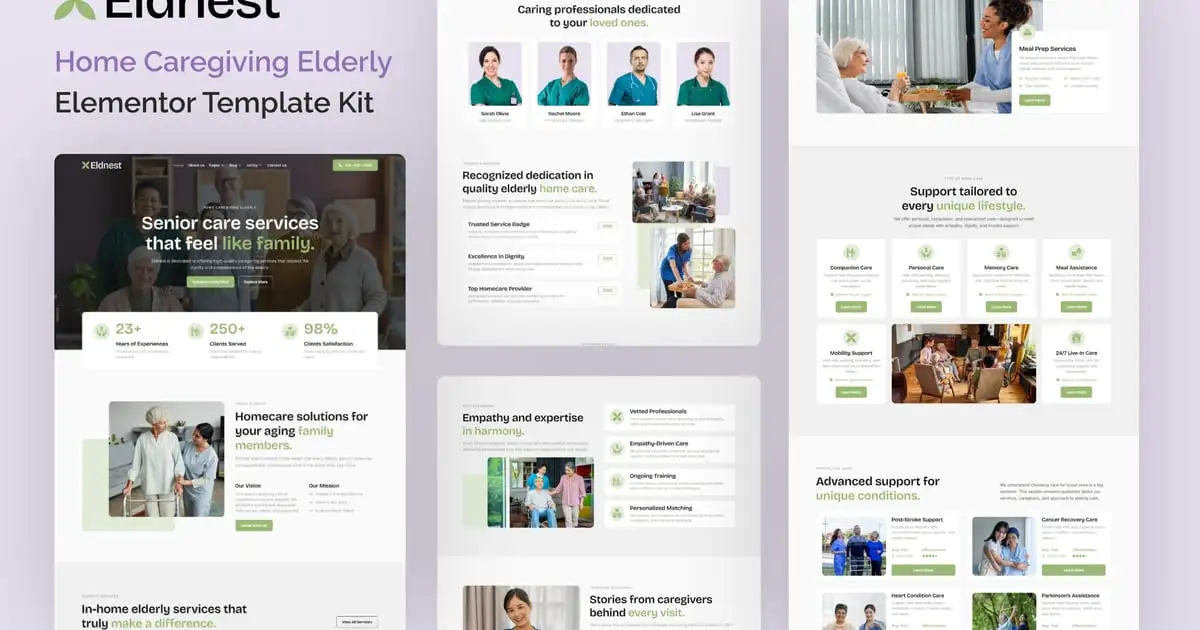
Introducing “Eldnest” – Your Ultimate Solution for Home Caregiving & Elderly Support Services in the WordPress Universe!
Unlock the potential of your caregiving service with the Eldnest Elementor Template Kit, designed to create a caring, professional, and trustworthy online space for families seeking support. Powered by the duo of Elementor and WordPress, this template kit is your ticket to building a warm and welcoming website that reflects your commitment to providing exceptional elderly care.
Whether you’re a home care agency, an assisted living facility, or an independent caregiver, Eldnest is designed to convey warmth and professionalism. Crafted with precision, our 21+ ready to use pages cater to every aspect of your service, from detailed pages explaining your care options to team profiles introducing your compassionate staff. With its Unique & Clean Design, families can easily find the information they need in moments of distress.
With Eldnest, you can provide a seamless experience for families with Click to Go To Top navigation, ensure accessibility for all users on any device with a Fully Responsive Layout, and build a consistent, reassuring brand with a modern design based on a design system. Being fully customizable with unlimited colors and more than 900 ready fonts, you can create a space that truly feels safe and welcoming.
Harness the power of Eldnest to connect with families, showcase your dedication to care, and provide a clear path for them to get the help they need. Elevate your service and build confidence from the very first click, all while enjoying the convenience of Elementor’s user-friendly interface. Eldnest: Compassionate care, right at home. Get started today and open your doors to those in need.
Suitable For:
- Home Care Agencies
- Nursing Homes & Senior Living Communities
- Medical Equipment Suppliers for Elderly Care
Features:
- Unique & Clean Design
- Modern design based on design system
- 21+ Ready to use pages
- Unlimited colors
- More than 900 ready fonts
- Fully Responsive Layout
- Fully Customizable
- Click to Go To Top
- Cross Browser Compatibility: Chrome, Firefox, Safari, Opera
Templates Include:
- Global Theme Style
- Design Guideline
- Homepage
- About Us
- Single Post
- Question Form
- Newsletter Form
- Contact Us Form
- Contact Us
- Coming Soon
- Error
- Our Blog
- Locations
- Honor & Awards
- Community
- Testimonials
- Events
- FAQ
- Become a Caregiver
- Our Caregiver
- Services
- Contact Form
- Footer
- Header
Required Plugin(included):
- Elementor
- The Plus Add-on
- ElementsKit Lite
- Gum Elementor Kit
- Metform
How to Use Template Kits:
This is not a WordPress Theme. Template kits contain the design data for Elementor only and are installed using the envato Elements plugin for WordPress or directly through Elementor.
Elementor Template Kits use the Envato Elements plugin to install.
Detailed Guide:
https://help.market.envato.com/hc/en-us/articles/36033428836889-How-to-Upload-Install-Elementor-Template-Kits-from-Themeforest-to-WordPress
https://help.elements.envato.com/hc/en-us/articles/36032349441945-How-to-Install-Elementor-Template-Kits-With-the-Envato-Elements-Plugin-in-WordPress-for-Envato-Elements-Subscribers
For further support, go to Elementor > Get Help in WordPress menu.
How to Import MetForm Custom Form:
- While edititing a page where a form should appear, open the Elementor navigator to locate the Metform widget.
- Click Edit Form in the builder panel.
- Select New, leave blank selected then click Edit Form button.
- Click ‘Add Template’ grey folder button.
- Click ‘My Templates’ tab.
- Choose your imported MetForm template, then click ‘Insert’.
- Once the template is loaded, click ‘Update’.
Setup Global Header and Footer in UAE
If you have Elementor Pro, setup headers and footers in Theme Builder. Pages you create with Elementor must have the Page Layout set to Elementor Full width for the global header and footer to appear.
- Go to UAE > Header Footer and click Add New button
- Give it a title and select Header, Display on Entire Website and click Publish
- Click Edit with Elementor
- Click the gray folder icon to access My Templates tab and select the header template to import and Update.
5 Repeat for Footer
IMPORTANT:
This Template Kit uses demo images from Envato Elements. You will need to license these images from Envato Elements to use them on your website, or you can substitute them with your own.
https://elements.envato.com/collections/49ACPKZSDR
Có thể bạn quan tâm


Thông tin thanh toán


Đăng ký theo dõi
Đăng nhập
Cũ hơn