
Scripts Dequeuer (Frontend)
150.000₫
Description
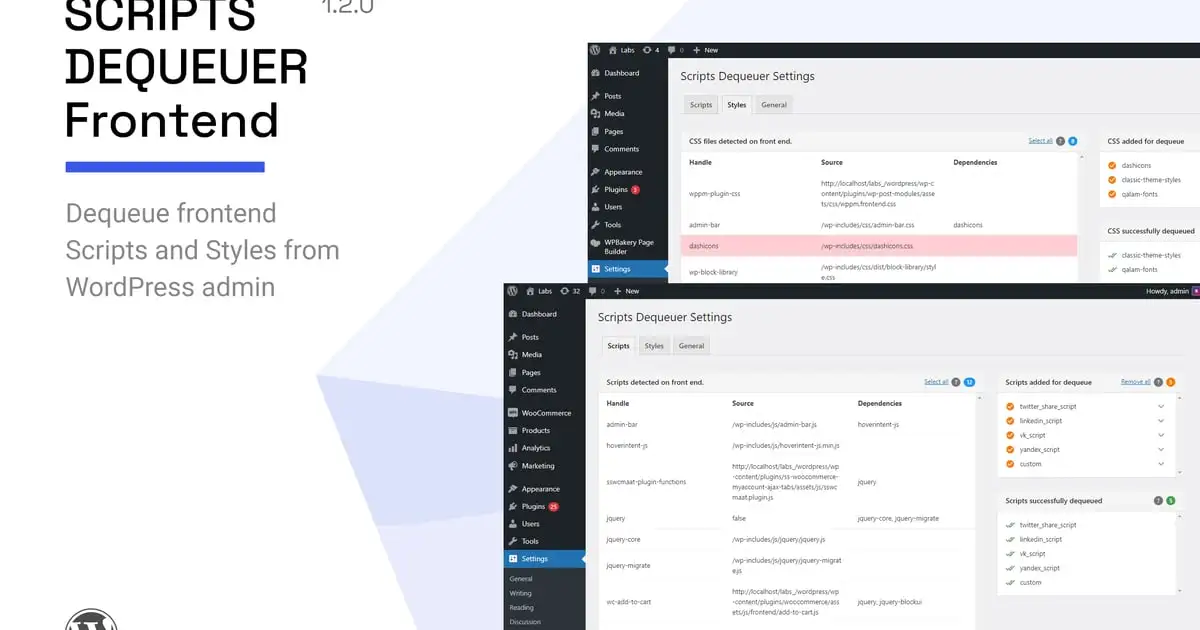
Scripts Dequeuer helps you dequeue WordPress frontend scripts and styles without touching any code. You just need to select scripts and styles from backend and they will be dequeued instantly.
Usage scenario
If you are running a WordPress website with good amount of traffic and expect decent revenue from it, you would be already aware about importance of site speed and performance optimization. A fast loading site can improve traffic and engage more users for you. While optimization can be done in many ways like, using caching plugins, optimized images, using CDN, etc., there are some situations which need a completely different approach.
For example, consider a case in which two different plugins use same CSS files (say, fontawesome CSS) and load them individually. Or consider a case in which two plugins are loading same JavaScript file, say, jQuery validate or jQuery Masonry individually. While WordPress takes very good care of preventing redundant enqueue by checking for same script handle names, such situation may still arise if the script handle names are different.
In such cases, the only direct solution is to dequeue/deactivate one of those redundant scripts for optimizing performance. While this can be done directly by adding some code in theme’s functions.php file, one would definitely like to have a user friendly way in which he/she can deactivate scripts without having to fiddle with the code. Scripts Dequeuer is developed to provide you such feature which lets you dequeue scripts and stylesheets in user friendly manner. The plugin is fast, light weighted, and is worth installing for such nifty feature.
How it works
If front end scripts and styles are enqueued using native WordPress hooks (wp_enqueue_scripts, wp_print_scripts, wp_print_styles, etc.), Scripts Dequeuer can detect all such scripts/stylesheets and list them inside WordPress admin area. There you can select scripts/stylesheets and add them for dequeue. Upon saving changes, selected scripts and stylesheets are dequeued and listed separately.
Furthermore, the plugin takes care of not dequeuing scripts which are required by other scripts. For example, if you select jQuery for dequeue, it won’t be dequeued if any other file still requires it. The plugin provides an option of “Force Dequeue” by ignoring dependencies. In that case you can force dequeue files by ignoring dependencies.
As of v1.1.0, the plugin also provides option for excluding pages or posts per dequeue item. Using this option you can specify which pages or posts shall dequeue the files selected in the plugin settings. This feature can be very useful in conditional script loading.
Which site locations are searched for scripts and stylesheets?
By default, the plugin searches for files on three locations – Your site’s Home page, a single post page, and an archives page. These three locations will contain most of your site’s CSS and JS files.
Additionally, you have option for providing custom URLs on which files shall be scanned. This is useful when themes or plugins are enqueuing files conditionally. For e.g. a contact-form.js file may be included only on a contact page, or a masonry.js file might only be loaded on a portfolio template page. In that case you can provide URLs of these pages for extra scanning. The plugin will scan all those pages and will list all enqueued scripts and stylesheets.
Why use this plugin?
If you are a developer or intermediate WordPress user, you can of course add some code in theme’s functions.php file for dequeuing scripts and stylesheets. However, upon switching themes, this code will get removed too (unless taken a backup). This plugin is intended for users who need a user friendly and reliable solution for dequeuing scripts without having to touch the code.
The plugin not only helps you dequeue files, it gives you a clear picture about total files used on front end, their sources and dependencies. If you are keen about site performance, optimization, and you do every possible thing to improve your website’s speed, you can definitely have this useful plugin in your collection. You will not regret it. Please also check plugin screen shots to get an idea about backend settings and features.
Key features
- Compatible with WordPress 6.2.x
- Unbranded settings panel with JavaScript tab navigation
- Shows complete list of scripts and styles detected on front end
- Detects scripts and stylesheets which are enqueued using WordPress native hook
- Ability to dequeue all scripts and stylesheets at once, or as per selection
- Option for excluding pages or posts per dequeue item for skipping dequeue operation. – New
- Shows separate portlets for “Dequeue list”, “Successfully dequeued list”, and “not dequeued list”
- Each portlet shows file count for better idea about number of files
- Custom “Add URL” option with jQuery sortable list
- Force dequeue option for ignoring script dependencies
- Clean and optimized code as per WordPress coding standards
- 100% Translation ready with sample .pot file included
- Documentation help manual with usage instructions
- Works with most themes and plugins (free + premium)
- Compatible on all major browsers with IE 9+
- Dedicated support in reasonable time span
Credits
Font icons from icomoon app<br />
http://icomoon.io/app/
Changelog
= Apr 03, 2023 – v1.2.0 =
- Ensured compatibility with WordPress 6.2 and php 8.0.0
- Fixed: Close button on custom URLs not working
- Fixed: Removed deprecated site_icon WordPress function
- Fixed: Clicking on the script check icon should toggle the icon inside dequeued scripts panel
= Aug 25, 2016 – v1.1.0 =
- Added feature for excluding pages and posts from dequeue operation. (Thanks to Nathan for suggestions).
= Important: After updating = - Remove all items from the Dequeue list and then add files again in order to see exclude options
= 1.0.0 =
- Initial release