Description
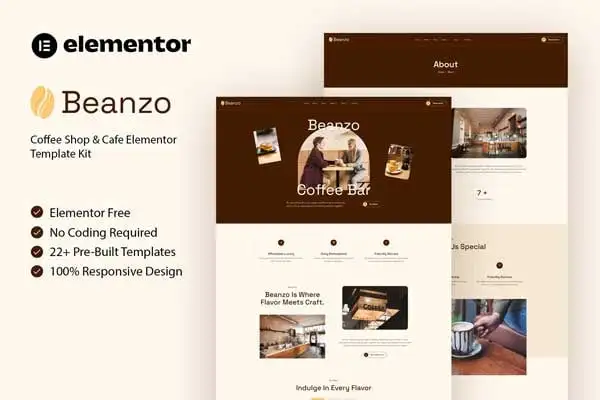
Beanzo – Coffee Shop & Café Elementor Template Kit is a stylish and user-friendly template kit crafted for modern cafés, baristas, roasteries, and bistros. Designed with Elementor, it gives you complete flexibility and customization without the need for coding. Beanzo comes packed with essential pages such as Home, Menu, About, Reservation, Gallery, Blog, Events, and Contact—helping you launch a professional coffee shop website quickly and effortlessly.
Fully responsive, SEO-friendly, and optimized for speed, Beanzo makes sure your café’s website not only looks beautiful but also performs flawlessly across all devices. From highlighting your coffee specialties to sharing your story and allowing customers to book a table, Beanzo helps you connect with your audience in a warm, authentic way. With clean layouts, modern typography, and easy-to-edit features, Beanzo is the ultimate template kit for creating a café website that feels as inviting as your coffee.
Features:
- For Coffee Shop & Cafe
- Fully With Elementor Free Version (Elementor Pro is not required)
- Simple, Modern and Clean Design
- No Coding Knowledge Required
- 22+ Ready To Use Templates
- Easy & Fully Customizable
Templates Include:
- Global Kit Style
- Home
- About
- Menu
- Reservation
- Team
- Events
- Gallery
- Testimonials
- Careers
- Career Detail
- FAQ
- 404 Page
- Coming Soon
- Contact
- Blog
- Single Blog
- Header
- Footer
- Jkit Tabs – Menu
- Metform Reservation
- Metform Contact
Plugins installed with kit:
- Jeg Elementor Kit
- MetForm
How to Use Template Kits:
This is not a WordPress Theme. Template kits contain the design data for Elementor only and are installed using the envato Template Kit Import plugin for WordPress or directly through Elementor.
Detailed Guide:
https://help.market.envato.com/hc/en-us/articles/36033428836889-How-to-Upload-Install-Elementor-Template-Kits-from-Themeforest-to-WordPress
For further support, go to Elementor > Get Help in WordPress menu.
How To Import Metform Costum Form
- Import metform template
- Import the template where the form appears, then edit in Elementor
- Click the Metform widget in the column where the form should be and click Edit Form
- Select New, leave blank selected then click Edit Form button
- Click ‘Add Template’ grey folder button
- Click ‘My Templates’ tab
- Choose your imported metform template, then click ‘Insert’
- Once the template is loaded, click ‘Update’
How to setup header in Jeg Elementor Kit plugin
If you have Elementor Pro, headers and footers may be customized under Theme Builder.
- Go to Jeg Elementor Kit menu item > Header Template
- Click Add New Header
- Add condition > All Site and click Create
- Click the pencil icon to Edit and elementor will appear
- Click gray folder icon to access My Templates tab
- Insert the header template.
- Customize and Save.
Images
This Template Kit uses demo images from Envato Elements. You will need to license these images from Envato Elements to use them on your website, or you can substitute them with your own.
- https://elements.envato.com/collections/UR4FP9V25D