Theme WordPress dịch vụ vay tiền 02 Original price was: 850.000₫.650.000₫Current price is: 650.000₫.

Advanced Custom Fields for WooCommerce Original price was: 100.000₫.80.000₫Current price is: 80.000₫.
Description
Description
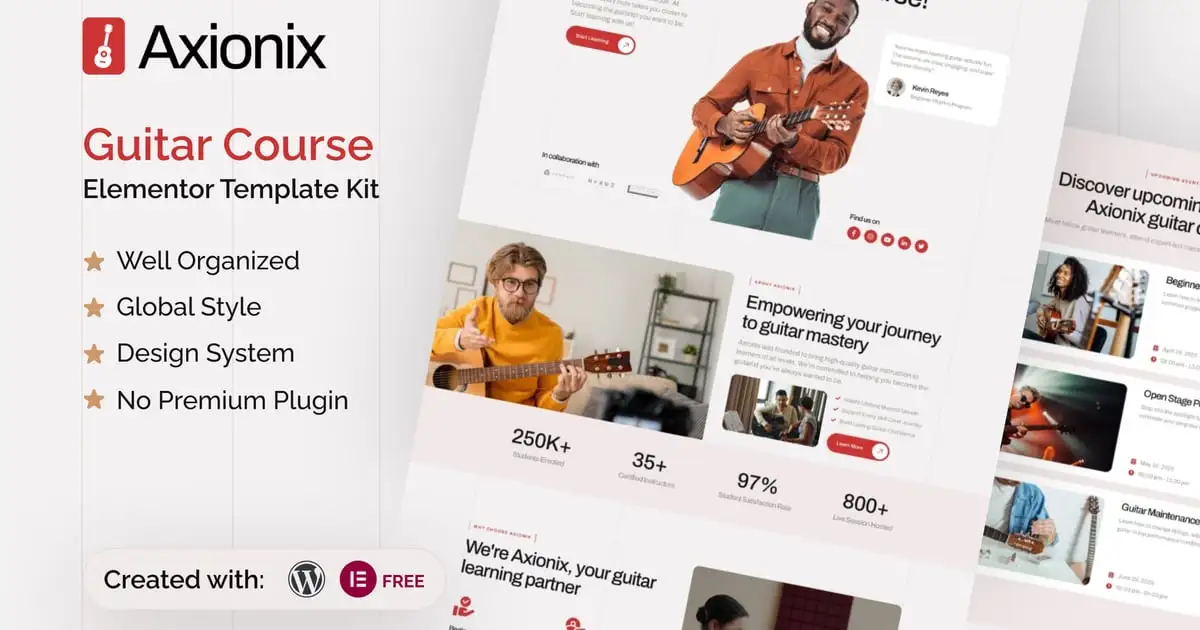
Introducing “Axionix” – an Elementor Template Kit designed specifically for Guitar Course websites built in WordPress. Whether you’re a solo guitar instructor, an online music school, or a platform offering beginner to advanced guitar lessons, Axionix gives you the perfect blend of style and performance to grow your music teaching brand online.
Built with Elementor and WordPress, Axionix makes it incredibly easy to customize every section without touching a single line of code. You can launch beautifully designed pages for lessons, teacher profiles, pricing plans, testimonials, and contact forms in minutes. This template is ideal for music teachers, guitar tutors, and institutions who want a modern, responsive, and conversion-focused site to attract students and showcase their expertise.
Axionix comes packed with 22+ professionally crafted templates that are built on a consistent design system, ensuring visual harmony across your site. The kit also features clean typography for optimal readability, lead generation-optimized layouts, fully responsive breakpoints, and thorough browser compatibility testing. It even includes a one-click “Back to Top” button for a seamless user experience. Axionix is fully customizable to match your personal or brand identity, making it the perfect toolkit for modern guitar educators.
Suitable For:
- Online Guitar Schools
- Children’s Music Programs
- Guitar Workshop & Events
Features:
- Modern & Professional Design for Guitar Courses
- Includes 22+ Ready-to-Use Templates
- Optimized Layouts to Increase Lesson Signups
- Clean Typography for Enhanced Readability
- Fully Responsive Across All Devices
- Easy Customization with Elementor – No Coding Required
- Unlimited Colors & 900+ Google Fonts
- Built with a Scalable Design System
- Tested on All Major Browsers for Maximum Compatibility
- One-Click Back to Top Navigation Feature
Templates Include:
- Global Theme Style
- Design Guideline
- Homepage
- Contact Us Form
- Subscribe Single Post Form
- Single Post
- Coming Soon
- Our Blog
- Career
- Error
- Contact Us
- Awards
- Community
- Locations
- FAQs
- Events
- Instructors
- Pricing
- Programs
- About Us
- Subscription Form
- Trial Access Form
- Footer
- Header
Required Plugin(included):
- Elementor
- The Plus Add-on
- ElementsKit Lite
- Gum Elementor Kit
- Metform
How to Use Template Kits:
This is not a WordPress Theme. Template kits contain the design data for Elementor only and are installed using the envato Elements plugin for WordPress or directly through Elementor.
Elementor Template Kits use the Envato Elements plugin to install.
Detailed Guide:
https://help.market.envato.com/hc/en-us/articles/36033428836889-How-to-Upload-Install-Elementor-Template-Kits-from-Themeforest-to-WordPress
For further support, go to Elementor > Get Help in WordPress menu.
How to Import MetForm Custom Form:
- While edititing a page where a form should appear, open the Elementor navigator to locate the Metform widget.
- Click Edit Form in the builder panel.
- Select New, leave blank selected then click Edit Form button.
- Click ‘Add Template’ grey folder button.
- Click ‘My Templates’ tab.
- Choose your imported MetForm template, then click ‘Insert’.
- Once the template is loaded, click ‘Update’.
Setup Header in ElementsKit Lite
If you have Elementor Pro, setup headers and footers in Theme Builder. Pages you create with Elementor must have the Page Layout set to Elementor Full width for the global header and footer to appear.
- Go to ElementsKit > Header Footer
- If prompted to go through the wizard, click Next all the way through and then return to step 1 (you are not required to enter your email address or share your information)
- Click Add New Template button at the top
- Name your template, then toggle “Activate/Deactivate:” to On
- Click the gray Edit Content button. Elementor will open.
- Click the gray folder icon to access My Templates tab and Insert the header or footer template.
- Customize and Publish
IMPORTANT:
This Template Kit uses demo images from Envato Elements. You will need to license these images from Envato Elements to use them on your website, or you can substitute them with your own.
- https://elements.envato.com/collections/G3LV74TAKM
Có thể bạn quan tâm
Thông tin thanh toán


Đăng ký theo dõi
Đăng nhập
Cũ hơn