Theme WordPress dịch vụ vay tiền 02 Original price was: 850.000₫.650.000₫Current price is: 650.000₫.

Advanced Custom Fields for WooCommerce Original price was: 100.000₫.80.000₫Current price is: 80.000₫.
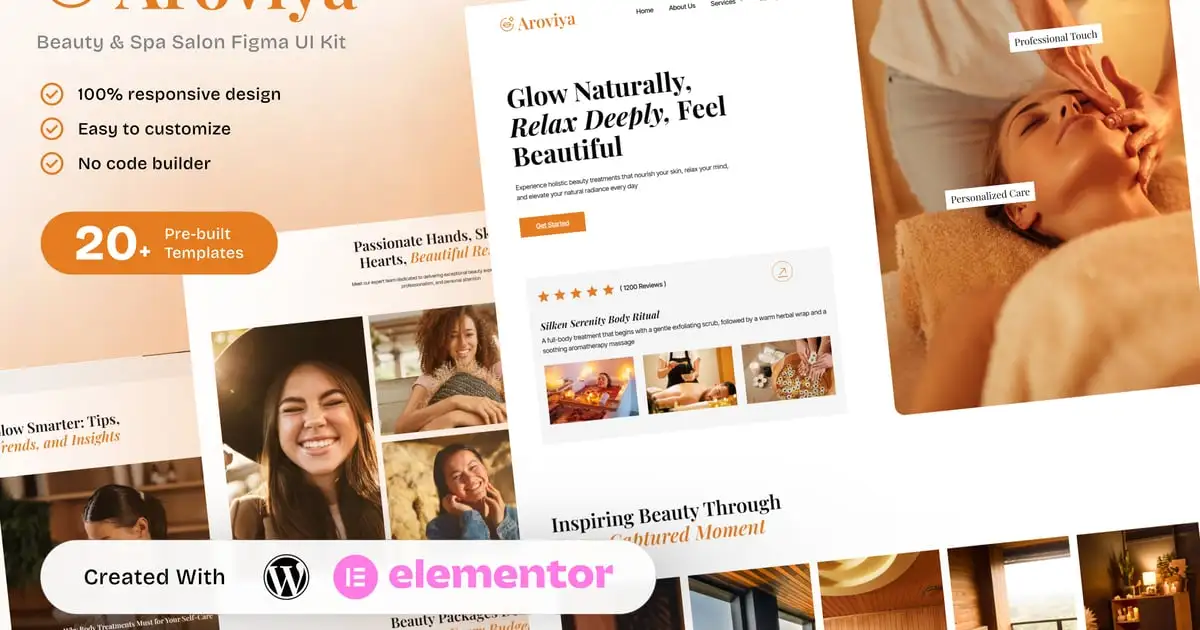
Aroviya – Beauty and Spa Salon Elementor Template Kit for Wellness and Self-Care Services
XEM DEMO WEB150.000₫
Description
Description
Aroviya is a graceful and calming Elementor Template Kit crafted for beauty salons, wellness centers, and spa studios. With soft color tones, elegant typography, and clean structure, it allows you to showcase your treatments, packages, and relaxation services in a luxurious and professional way.
Perfect for spas, skincare clinics, massage therapy providers, and holistic wellness businesses, Aroviya is fully responsive and requires no coding, just drag and drop using Elementor Free.
Key Features:
- 20+ ready-to-use page templates
- Easy customization with Elementor
- Optimized for SEO & lead generation
- Using Free Plugins (Elementor Pro is not required)
- Cross Browser Compatibility: Chrome, Firefox, Safari, Opera
- Built with Free Plugins – No premium add-ons required, making setup hassle-free.
- 100% Fully Responsive & mobile-friendly
- Customize fonts and colors in one place (Global Kit Style)
- One-Click Installation – Import demo content easily with the Envato Elements plugin.
- Fast-loading, clean code, and cross-browser compatible.
Templates in Zip:
- Global Style
- Homepage
- About Us
- Services Overview
- Service Detail
- Pricing Packages
- Gallery
- Team
- Blog
- Testimonials
- Booking
- Contact Us
- Careers
- 404 Error
- Single Post
- Header
- Footer
Required Plugins:
- Elementor
- MetForm
- ElementsKit Lite
- Ultimate Addons for Elementor
- RomethemeKit For Elementor
- Jeg Elementor Kit
How to Use Template Kit:
This is not a WordPress Theme. Template kits contain the design data for Elementor only and are installed using the envato Elements plugin for WordPress or directly through Elementor.
- Download your kit file from Envato and do not unzip it. If you use Safari browser you may need to ensure “Open safe files after downloading” is disabled in the browser preferences.
- Go to Settings > Permalinks and ensure Post Name is selected
- Go to Appearance > Themes > Add New and ensure Hello Elementor is installed and activated. This will prompt you to install Elementor if you haven’t already.
- Go to Plugins and ensure Elementor and Envato Elements are installed and at the latest version. If your kit requires Elementor Pro, it must be installed now and connected to your account.
- Go to Elements > Installed Kits and click Upload Template Kit Zip (or click your kit to view it)
- Check for the orange banner at the top and click Install Requirements to load any plugins the kit uses. https://envato.d.pr/ughD8Q
- Click import on the Global Kit Styles first. This will setup the site settings.
- Click Import on one template at a time in the order shown. These are stored in Elementor under Templates > Saved Templates and are re-used from here.
Creating pages:
- Go to Pages and create a new page and click Edit with Elementor
- Click the gear icon at lower-left of the builder to view page settings and choose Elementor Full Width and hide page title
- Click the gray folder icon to access My Templates tab and then Import the page you’d like to customize.
- The home page is set under Settings > Reading by selecting Static Front Page.
If you have Elementor Pro, headers and footers are customized under Templates > Theme Builder.
Detailed Guide: https://help.market.envato.com/hc/en-us/articles/900000842846-How-to-use-the-Envato-Elements-WordPress-Plugin-v2-0
Images:
This Template Kit uses demo images from Envato Elements. You will need to license these images from Envato Elements to use them on your website, or you can substitute them with your own.
https://elements.envato.com/collections/JK7HBS2MZ9
Aroviya – Beauty & Spa Salon Elementor Template Kit
Aroviya is the perfect solution for spa and beauty professionals who want a gentle and elegant website that reflects their focus on comfort, care, and personal wellness.
Create by: Create Big Supply
Có thể bạn quan tâm
Thông tin thanh toán


Đăng ký theo dõi
Đăng nhập
Cũ hơn