Theme WordPress dịch vụ vay tiền 02 Original price was: 850.000₫.650.000₫Current price is: 650.000₫.

Advanced Custom Fields for WooCommerce Original price was: 100.000₫.80.000₫Current price is: 80.000₫.
Description
Description
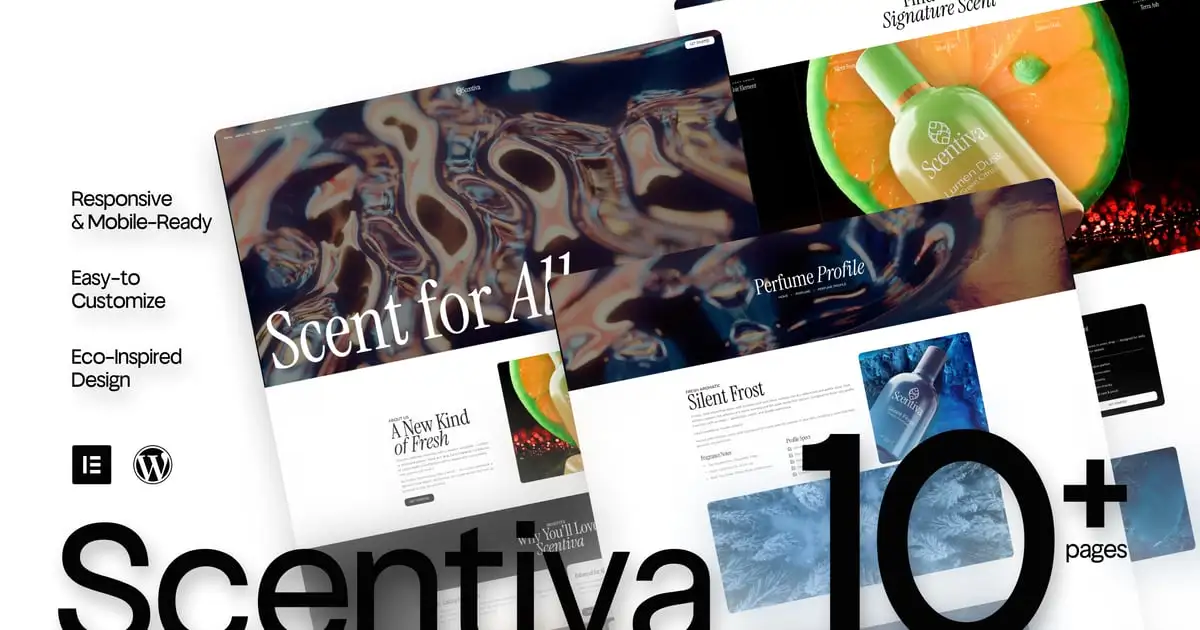
Scentiva is an elegant and expressive Elementor template kit, curated for perfume brands, beauty labels, and fashion-forward creators who believe visuals should feel like scent — soft, luxurious, and unforgettable.
Crafted with artful layering, editorial elegance, and modern fluidity, Scentiva brings experimental beauty to life on every scroll. Think: floating type, expressive whitespace, and layouts that breathe. It’s where high fashion meets lightweight code — and your brand becomes a feeling.
Responsive, mobile-friendly, and powered by Elementor Free, Scentiva lets your story unfold like a fragrance: slowly, beautifully, and full of presence.
Features Specification:
- Built with Elementor Free (no pro required)
- Fully responsive on all screen sizes
- Light-weight design for fast loading
- Artistic, editorial-style layout
- Designed for perfume, fashion, and beauty brands
- Elegant typography & floating visual composition
- Easy to customize — no code needed
- Perfect for campaigns, product launches, or brand storytelling
- Includes hero sections, product galleries, about pages, and contact forms
- Casloop-crafted with visual emotion
Pages Included:
- Home
- About Us
- Perfume
- Pefume Profile
- Pricing
- FAQs
- Essence Makers
- 404 Page
- Thank You
- Contact Us
Blocks Included:
- Header
- Footer
Included Plugins:
- Elementor
- Jeg Elementor Kit
- Met Form
- ElementsKit
How to Use Template Kits:
This is not a WordPress Theme. Template kits contain the design data for Elementor only and are installed using the envato Template Kit Import plugin for WordPress or directly through Elementor.
Detailed Guide:
https://help.market.envato.com/hc/en-us/articles/36033428836889-How-to-Upload-Install-Elementor-Template-Kits-from-Themeforest-to-WordPress
For further support, go to Elementor > Get Help in WordPress menu.
How to setup header in Jeg Elementor Kit plugin If you have Elementor Pro, headers and footers may be customized under Theme Builder.
- Go to Jeg Elementor Kit menu item > Header Template
- Click Add New Header
- Add condition > All Site and click Create
- Click the pencil icon to Edit and elementor will appear
- Click gray folder icon to access My Templates tab
- Insert the header template.
- Customize and Save.
How to Import Metforms If you have Elementor Pro, skip install of Metform and form blocks.
- Import the metform block templates
- Import the page template where the form appears and right-click to enable the Navigator
- Locate and select the Metform widget and click Edit Form. Choose New, then Edit Form. The builder will appear
- Click ‘Add Template’ grey folder icon.
- Click ‘My Templates’ tab.
- Choose your imported metform template, then click ‘Insert’ (click No for page settings).
- Once the template is loaded, make any desired customizations and click ‘Update & Close’ The form will appear in the template
- Click Update
Images This Template Kit uses demo images from Envato Elements. You will need to license these images from Envato Elements to use them on your website, or you can substitute them with your own. Blog Content is not included – you will need to add a few posts to WordPress before post content will appear in templates. : https://elements.envato.com/collections/HD8VE4QSJW
Có thể bạn quan tâm
Thông tin thanh toán


Đăng ký theo dõi
Đăng nhập
Cũ hơn