Theme WordPress dịch vụ vay tiền 02 Original price was: 850.000₫.650.000₫Current price is: 650.000₫.

Advanced Custom Fields for WooCommerce Original price was: 100.000₫.80.000₫Current price is: 80.000₫.
Description
Description
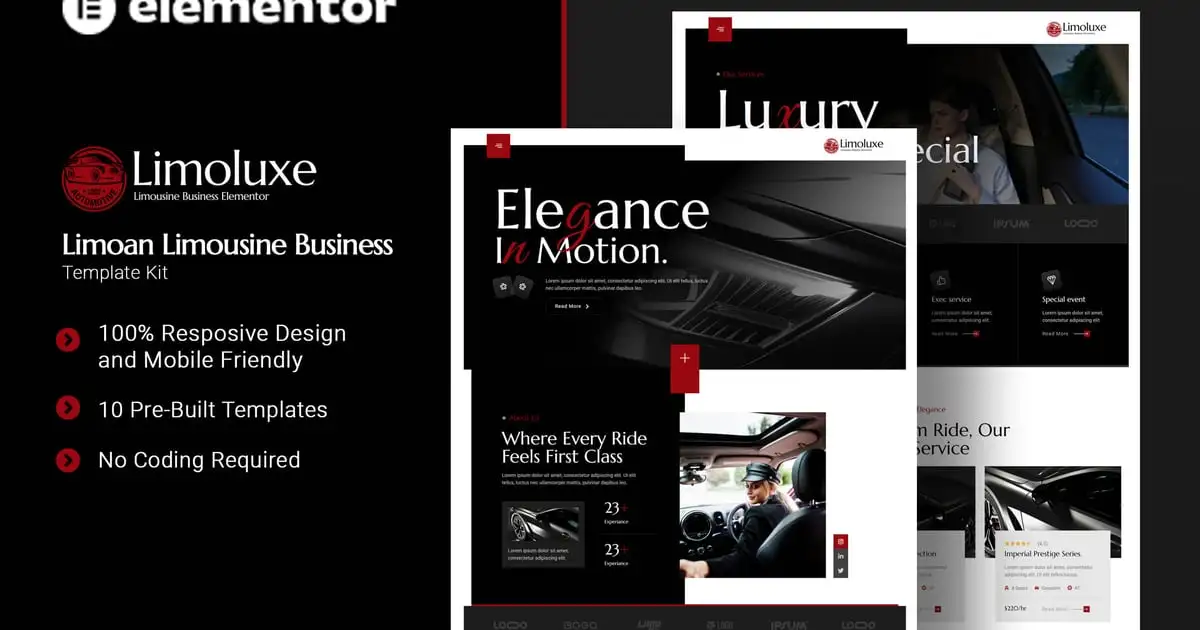
Limoluxe is a sleek and luxurious Elementor Template Kit crafted specifically for limousine and chauffeur service businesses. Ideal for high-end transport providers, executive car rentals, and private drivers, this kit allows you to showcase your premium services, emphasize professionalism, and build trust with elite clients. With its elegant design and intuitive layout, Limoan ensures your brand reflects sophistication, comfort, and class—perfect for making every ride unforgettable. Limoluxe uses free elements, so don’t worry about trying this one. Limoluxe provides various pages including Home, About Us, Team, Services, Service Detail, Project, Pricing, FAQs, Blog, 404, Contact Us.
### Templates
- Home
- About Us
- Team
- Servives
- Services Detail
- Project
- Pricing
- FAQs
- Blog
- 404
- Contact Us
### Plugin Dependencies :
- Elementor
- Jeg Elementor Kit
- The Plus Addons For Elementor
- Metform
### Font Used
- Marcellus
- Great Vibes
- Roboto
### How to Use Template Kits:
This is not a WordPress Theme. Template kits contain the design data for Elementor only and are installed using the envato Elements plugin for WordPress or directly through Elementor.
Elementor Template Kits use the Envato Elements plugin to install.
Detailed Guide:
https://help.market.envato.com/hc/en-us/articles/36033428836889-How-to-Upload-Install-Elementor-Template-Kits-from-Themeforest-to-WordPress
https://help.elements.envato.com/hc/en-us/articles/36032349441945-How-to-Install-Elementor-Template-Kits-With-the-Envato-Elements-Plugin-in-WordPress-for-Envato-Elements-Subscribers
For further support, go to Elementor > Get Help in WordPress menu.
How to setup header in Jeg Elementor Kit plugin
If you have Elementor Pro, setup headers and footers in Theme Builder. Pages you create with Elementor must have the Page Layout set to Elementor Full width for the global header and footer to appear.
- Go to Jeg Elementor Kit menu item > Header Template
- Click Add New Header
- Add condition > All Site and click Create
- Click the pencil icon to Edit and elementor will appear
- Click gray folder icon to access My Templates tab
- Insert the header template.
- Customize and Save.
How to Import MetForm Custom Form:
- While edititing a page where a form should appear, open the Elementor navigator to locate the Metform widget.
- Click Edit Form in the builder panel.
- Select New, leave blank selected then click Edit Form button.
- Click ‘Add Template’ grey folder button.
- Click ‘My Templates’ tab.
- Choose your imported MetForm template, then click ‘Insert’.
- Once the template is loaded, click ‘Update’.
### Images
This Template Kit uses demo images from Envato Elements. You will need to license these images from Envato Elements to use them on your website, or you can substitute them with your own.
- https://elements.envato.com/collections/CZ3M4HRWA2
Có thể bạn quan tâm
Thông tin thanh toán


Đăng ký theo dõi
Đăng nhập
Cũ hơn